Showing posts with label ETEC 591. Show all posts

Sunday, August 2, 2020

Creation and Collaboration: Wikis for Education

As a child of the 90s, one of my favorite things to do on our home computer was pop in the Encarta '95 CD-ROM and start clicking. Encarta was gorgeous: full-color photographs, embedded midi files, video clips. As I learned about Roman Empires, at the bottom of the article would be a link sending me to another page, then another and another, and
I loved clicking from one article to the next.  As a voracious reader, this was even faster than books and, more importantly, free. No trips to the library, no borrowing from teachers. All this information was here for the taking.

Just a few years later, Wikipedia burst onto the scene and changed encyclopedias forever. Encyclopedias were no longer expensive volumes or even software, but available to anyone with the internet. More importantly, anyone with internet access could add their OWN additions to the encyclopedia. In the decade since Wikipedia has become so ubiquitous, there are numerous off-shoots: Ballotpedia, an almanac of US politics; Wikibooks, a free textbook collection; and my personal favorite, Wookieepedia, a Star Wars encyclopedia. 

Although Wikipedia is perhaps the most well-known wiki, wikis were developed over 10 years earlier by Ward Cunningham who had the idea to collaboratively build things on the internet (1). With just a computer and internet access, any group of people could collaborate on a wiki. 

Anyone who's ever had to have something published or peer-reviewed knows what a languishing process publication can be. A wiki is instant. The openness with which wiki pages can be edited is also what contributes to its success. Everyone and anyone can see the editing process and make corrections or call out the original contributor as needed. To me, a wiki is the best part of the internet: open information and collaboration. 

Affordances

The site I'm choosing to discuss today, PBworks, has been around since the early 2000s and is used by many business and educational groups (2). The earliest versions of wikis required knowledge of markup language, but thankfully the process has become much more simplified. If you can edit a Google Doc, you can edit a wiki.  


I grew up with Windows 3.1 and the original Napster, so the homepage of PBworks looks familiar to me. I don't think it's as aesthetically pleasing as some other websites, and I could see my students perhaps pausing, but it is logically laid out. If you just read left to right, you can see the labels: Wiki, Pages, Users, and Settings. 

On the Frontpage are a VIEW and EDIT tab. Selecting Edit changes the page to look very similar to a Word doc or a blog post. As you type in the box and save, clicking back to the View tab shows the page is immediately updated. With PBworks, a student can be editing a live web page in under 5 minutes. 


Selecting Pages shows a list of pre-filled template pages that would work with an educator's account including syllabus and assignments. Editors can add pages here as needed and it can be organized into folders.


PBworks allows different types of users: page-level users can only access pages you explicitly give them access to; readers can view pages, but not edit; writers can view and edit pages; editors can view, edit, move and delete pages and folders; and administrators always can do anything on pages and folders. This is great for teachers because I can allow student access to just certain pages. 


The last tab, Settings, offers a little bit of customization. Because this is an educator account, I can also create classroom accounts that will automatically generate usernames and passwords if my students don't have email accounts. I can also add my students on the Users tab by simply copying and pasting email addresses. 

A few other features I like are the nested tables on the right side of the home page. The Sidebar can be edited like any other page. I can add links there, offer another navigation section, whatever I need.  I also really like the Recent Activity section, so I can see which of my users are contributing and what they worked on. It also has a built-in plagiarism checker which would be a boon in any writing course.

AP Lang Uses

A wiki would work very well with teaching argumentative writing, one of the main modes of writing my students do throughout the year. I could create a page with sample argumentative essays, allowing students to read and comment on what they notice after reading the samples. 

My student’s first argumentative essay is written in small groups. Using PBworks, students would have editing rights to the same page and create the essay there. As any teacher knows, often group work turns into a high achiever doing 90% of the work. With PBworks, I could actively see which students contributed and what their contributions were. 

When students are ready to write their own arguments, they could have access to their own wiki page. It would be a really effective addition to the writing process because instead of arbitrarily setting up deadlines (rough draft 1, rough draft 2, final draft) other students could be fact-checking and offering editing and revisions throughout the writing process. Furthermore, publishing their essays to PBworks would add an authentic audience. 

Learning Theory/Distributed Cognition 

As a constructivist, a wiki would allow my students to build their knowledge through authentic experiences. Instead of writing to an audience of one, students will be collaborating and writing to a worldwide audience. By reading each other's arguments, they could begin applying effective argumentative tactics to their own writing. I am no longer the one directing all information to them; they are curating their own experiences and knowledge. 

A wiki also offers many opportunities for distributed cognition. Right now I control our LMS, Canvas. Using a wiki as a shared space for my class would allow students to contribute a page of shared notes. Students could collaborate on mnemonic devices that help them remember the rhetorical situation.  I think most teachers long for students to take ownership of their learning, and a wiki seems like a great way to build that ownership. With a wiki, students could have an authentic voice in the classroom and be able to add information to the class site that they want and need. 

Conclusion

In 1994, my dad downloaded an image from a NASA Jet Propulsion Lab server of the Shoemaker-Levy comet crashing into Jupiter. He showed my mom, then downloaded it onto a floppy disk and took it to work where he gave it to a fellow science nerd. A week later, my mom called him into the living room where the 10 o’clock news was showing that very same image from the JPL. My dad looked at my mom and said, “We don’t even need them anymore. We make the media.”

What makes Wikipedia different than my beloved Encarta CD?  In its final version, Encarta consisted of 62,000 articles. Wikipedia currently contains 6.1 million articles...just in English. With wikis, there are no more gatekeepers to information. Now, we make the media.

Sunday, July 26, 2020

Wait! Somebody Has Probably Done It Better

As a first-year teacher, and the only 8th grade English teacher at my small 2A school, I remember the school secretary taking me aside and whispering conspiratorially that her best friend, my predecessor, had left me the notebook of E-V-E-R-Y-thing she taught. My joy was short-lived as she handed me a binder with the 8th grade ELA TEKS printed and highlighted.

Bless her heart.

I knew the TEKS. I had printed and highlighted them myself. What I didn’t know was how to put it all together. Students should “write responses that demonstrate understanding of texts, including comparing sources within and across genres.”(1) That sounds great, but how do I put that into practice?

I had 10-year-old textbooks and 115 students showing up in a week. So, I turned to the internet and found my saving grace-Teachers Pay Teachers. I spent hundreds of dollars over the next few years as I tried to balance being a teacher and new mom. I don’t begrudge the teachers who sell on that site, but I do resent spending my own money on curriculum that should have been provided. Even worse, sometimes I would buy resources that didn't fit what I needed it to do or were inaccurate.

Thankfully, in the decade I've been teaching, I have gotten pickier and more resourceful about the sources incorporated in my classroom. Even better, I have found there is a plethora of quality content that doesn't cost anything.

KHAN ACADEMY

One well-known online resource is Khan Academy. Khan Academy began in 2005 with Sal Khan creating tutorial videos for his cousin. In the 15 years since, Khan Academy has grown by leaps and bounds, fulfilling their mission statement to “provide a free, world‑class education for anyone, anywhere.”(2)

I first heard about Khan Academy because our math department would utilize their videos for sub plans, extra practice, or remediation. Early on, Khan Academy didn't offer a whole lot of ELA content, but that has changed. 

Sign up is easy for teachers, students, or parents. One nice thing about Khan Academy is the inclusion of teacher training. They really want teachers to fully utilize their site and have tons of built-in training.

I was very excited to see that Khan Academy had officially partnered with College Board in AP practice. However, a closer look showed me one course suspiciously missing. . .


Although Khan Academy does not have ready-made modules for AP Lang, they still have quite a bit of content that could work in an ELA classroom. Khan Academy focuses on Mastery learning so students have to get a certain percentage right to unlock the next stage in the learning practice. I’ve found this type of gamification really effective. It's low-stakes enough to not put a lot of pressure on students and puts the onus on learning, not a specific grade. The grammar module will be perfect for this.  Many of my students are proficient in grammar, but the ones who aren't could work at their own pace to achieve mastery.

I also searched for the types of writing that I teach in AP Lang. I was very excited to find videos rhetorically analyzing pieces we already read in class like Lincoln's inaugural address and the Federalist Papers. Close reading is a skill that we work on all year, and I often model close reading on an overhead camera in my classroom. With virtual learning, it's really nice to have these videos already made so that students can watch the process of rhetorical analysis through annotation.


All in all, Khan Academy is a much more robust resource than I originally thought, and I look forward to incorporating it into my classroom.

MIT OPEN COURSEWARE

Like Khan Academy, MIT Open Courseware (OCW) operates off the idea that knowledge should be free and education available to everyone.  This amazing offering from the Massachusetts Institute of Technology has made over two thousand FULL college courses available. This program costs 2.7 million dollars to operate a year and depends largely on donors. Professors donate 5 to 10 hours per course offering, and MIT has a full-time staff of 12 to operate OCW. (3) 

The discovery of this website has been a boon in teaching APLang. A quick search of writing courses reveals almost 150 different classes available.

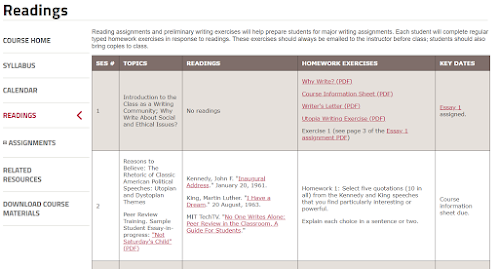
I chose "Writing and Rhetoric: Rhetoric and Contemporary Issues,"a class that would be comparable to AP Lang. It begins with a course overview page. (4)

The Syllabus tab includes everything needed to teach this class for yourself. I remember as a new teacher trying to come up with class policies, dividing up the percentage points for grading, trying to decide how many texts per week were too many or too few. The syllabus has all of that.

The next tab is Calendar, and true to name it outlines the semester’s work. I find the Reading tab even more important. It is set up like the Calendar but includes hyperlinks to the readings covered in the classThe Assignment tab covers all the types of assignments outlined in the calendar.  Again, as a new teacher, I struggled so much with how to format assignments or how long essays should be. This tab covers many of those questions.

The last tab is Related Resources and it has handouts, writing resources, and links to other sites that might be helpful in finding texts or managing the class.


TERMS OF SERVICE

Khan Academy has a 17 Page terms of service agreement. To me, the key was that users have “a limited, non-exclusive, non-transferable, non-sublicensable, revocable license to download, install, view and use the . . . Content. . . solely for your personal, non-commercial purposes.” (5)

MIT OCW operates under a Creative Commons license that allows users to “copy and redistribute the material in any medium or format and. . . remix, transform, and build upon the material. . . [as long as]you must give appropriate credit… and [do]not use the material for commercial purposes.” (6)

Essentially, both sites allow the liberal use of the materials for educational use, but users may not use any material found on the sites in any commercial venture.

CONCLUSION

In 12 years of teaching, I’ve been given seven different textbooks. I’ve survived three different sets of state standards, C-Scope, and scopes and sequences with neither. With just Khan Academy and MIT OCW, I can easily create high-quality courses for my classes. Better yet, I don't have to pay for or create them and can save my energy for feedback, relationship building, and actually teaching.

Monday, July 20, 2020

Edmodo VS Canvas

Canvas and Edmodo are both easy to use course management systems that teachers can utilize in blended, flipped, or digital learning.

In both systems, creating an account as a teacher is as easy as having an email address. Once you have created your account, you can add classes and begin setting up your online course.

Canvas and Edmodo offer many similar features that make it appealing to teachers. Teachers need to create content for students to engage with and teachers need to be able to assess students. Students should be able to interact with each other and the instructor. Students need to keep up with assignments and turn those assignments in. Edmodo and Canvas tackle these issues in similar ways.


As a student, the Edmodo layout is direct. Classes are listed on the left and a built in planner on the right hand side keeps track of coursework.


One fun aspect of Edmodo is the Discovery tab. For students, this tab offers up educational games and apps that work within Edmodo.

This tab for teachers is an instant learning community where teachers can find lessons and add-ons for Edmodo.

From a student standpoint, Edmodo is easy to navigate. Students can log-in with their Google email address, and OneDrive and Google Drive are integrated into the aptly named Backpack. Edmodo has clearly made many improvements since I used it years ago. 

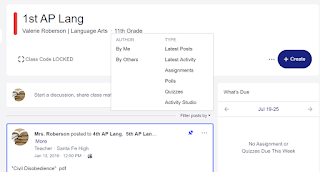
From a teachers perspective, Edmodo is easy to use as well, but in my opinion, Canvas wins in the organization department. In Edmodo, everything is in a stream (much like Google Classroom). You can filter by type of assignment, but that can be cumbersome, especially if a teacher is posting multiple things per day. 
     

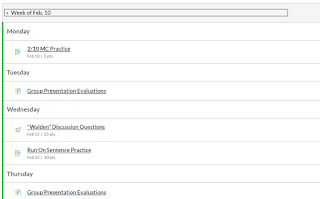
Canvas is organized into Modules. Teachers have the flexibility to set up these modules by week, by unit, or however they see fit.


Modules have arrows at the bottom that allow students to navigate from one page to the next. This allows a teacher to curate the learning experience from formative assessment, to learning activities, to summative assessment.

I created an Edtech module for new students to my school. It begins with a pre-test to determine their starting point. They then navigate through pages that explain different tech available to them. Unlike traditional lectures which depend on a student's ability to remember and/or take notes, students can return to the material at any time. The affordances of online delivery allow for deeper learning.

Both Canvas and Edmodo deliver content and allow students to have a more tailored learning experience. I appreciate that my district pays for Canvas, but for a free course management system, Edmodo is a fantastic option.

Sunday, July 12, 2020

Google Apps in the ELA Classroom

This week’s design experiment was somewhat bittersweet. As a long time Google fan, I used Google Classroom years ago when my district was trying out different learning management systems. For a variety of reasons, my district chose Canvas (which I've grown to love) but in some ways, revisiting Classroom was like coming home. 


Using Google Classroom

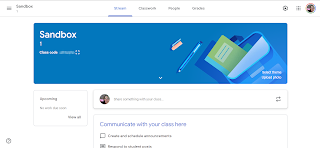
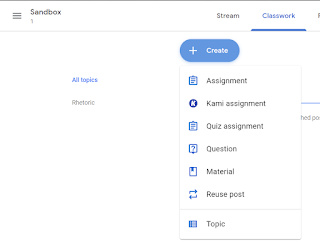
The affordances of Google Classroom make it easy for even non-tech savvy teachers to use. They have added many features since I last used Classroom, such as topics and Kami assignments. One of my biggest critiques with Google Classroom is that organization can be overwhelming, but adding topics and using icons to differentiate between materials is a great step in aiding teachers in the organization of the online classroom. Google Classroom has changed the face of online learning with Classroom and its suite of apps. 


For many, when they hear Google, they think email and they think Docs. It’s hard to believe Google Docs and Slides came out almost fifteen years ago. As a broke college student, I was a very early adopter of Google Docs because my nerd husband ran Linux on our home computer and we couldn’t use the ubiquitous Microsoft Office. As an English student, I had to use type papers and loathed OpenOffice, so Google Docs was a godsend. 

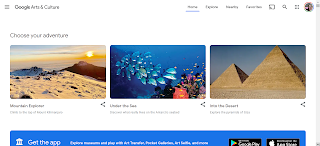
In the decade and a half since Google Docs, Sheets, and Slides appeared, Google has continued to explore apps. One Google app that I have underutilized is Arts & Culture. This app is the partnership between Google and cultural organizations to bring images and videos to the public. It's almost 10 years old and has grown from an initial 17 partners to 151 museums.1 It is beautifully designed and well-organized into sections including Choose Your Own Adventure, Music + Art, and Explore. 

Google Arts & Culture


One of the 10th grade standards in Oklahoma is to analyze the intended rhetorical purpose in written, oral, visual, digital, and interactive texts to create new understandings. When I'm teaching rhetorical analysis, we often begin with visual pieces as an intro to rhetorical analysis. This year instead of me choosing the piece, I'll allow students to use Google Arts & Culture, choose a museum, and then choose a piece to analyze. 

In Learning to Choose, Learning to Learn, Mike Anderson identifies student choice as one method of fighting student apathy. My students might never be excited about rhetorically analyzing artwork, but giving them the autonomy to choose a piece to analyze will hopefully tap into some ownership of the assignment. The majority of my students will probably never be able to visit the museums curated on this site, so the content (rhetorical analysis) and the pedagogy (student choice) will be greatly augmented by Google Arts & Culture. 

Google Jamboard


Another Google app I'm in love with is Jamboard. Jamboard is much newer and originated as hardware that allowed people to collaborate together on a 55” screen. Although I don’t have the hardware, the software is available to any Google user. When I first started looking at it it seemed similar to Slides, but after using it a bit, it is so much more than that. Jamboard is developed for collaboration. It's a Google app, so it's well designed and streamlined, with affordances that make it easy to use. 

One standard I teach is applying components of a recursive wring process for multiple purposes to create a focused, organized, and coherent piece of writing, so I'm always looking for a way to get students to prewrite. Especially at the beginning of the year, I focus a lot on the thinking that goes into an essay much more than actually writing full-length essays.

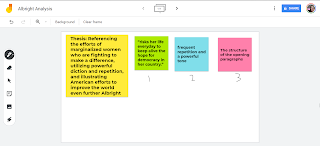
After my students have read a piece, I'd like to put them in pairs to brainstorm an analytical essay, using sticky notes in the Jamboard to create the shell of an essay. After I have looked at their prewriting to make sure they're on the right track, students can add frames and spread those sticky notes across each frame. Jamboard allows outside images to be inserted, so instead of having students write the entire essay, they can create a graphic essay, a layer of complexity made easier through Jamboard. As a constructivist, I use often use prewriting and graphic essays to scaffold writing. Having done prewriting with actual sticky notes, I can’t wait to use Jamboard! Especially when I think about potentially teaching online in fall, Jamboard offers virtual collaboration and infinite redos. 


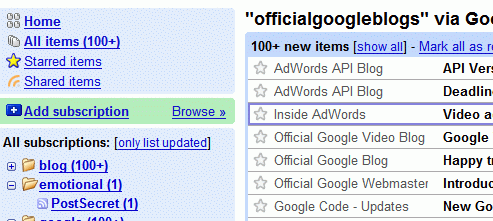
Although I’ll never forgive Google for taking away my beloved Reader, I’m still a Google fan and I’m thankful that my students have access to so many opportunities for learning through Google apps. 

RIP Reader
Gone But Not Forgotten

_________________________________________________ 

1. Knowles, Jemillah. "Google's Art Project grows larger with 151 museums online across 140 countries". TNW Google Blog. The Next Web. Retrieved 6 April 2012.